MOUNTUP
MOUNTUP Triple Monitor Mount, Triple Monitor Desk Mount for Max 27 inch Computer Screens, 3 Monitors Stand for Desk, Monitors Arm with Swivel, Tilt, Rotation, Each Arm Holds 4.4-19.8 lbs
Couldn't load pickup availability
About This
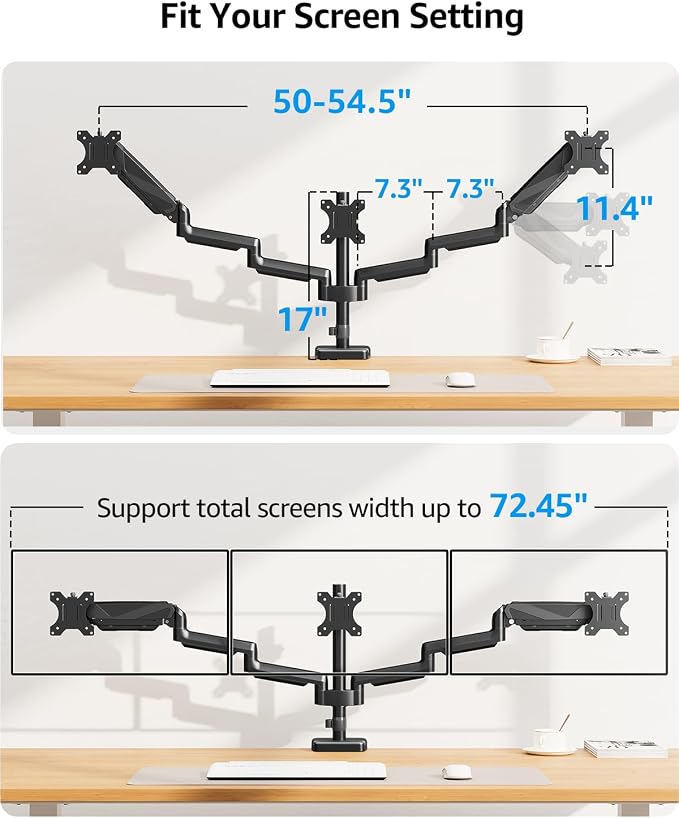
- Universal Compatibility: Triple monitor stands perfectly fit most flat or curved computer displays up to 27", including but not limited to 27, 25, 24, 23, 22, 21.5, 21, 20, 19, 17 inches display. Each arm supports a weight of 4.4-19.8 lbs, compatible with VESA patterns 75x75mm and 100x100mm. Fit for most tables with a thickness or a hole diameter of 0.39"-3.15".
- Articulating Triple Monitor Mount: The fully adjustable monitor arms can tilt ±90°, swivel ±90°, and support rotation 360 degrees. The Center screen can be height adjusted, 2 spring arms make the extension, retraction, and height adjustment dynamically and easily. With multiple screen combinations, easily find an optimal viewing angle and position for comfortable work.
- Desk Space Saver: The 3 monitor stand mount get displays off your desk conveniently, and the standing pole design helps you to gain a ton of extra space. Integrated cable management to keep cables tucked in arm neatly, hide the sore eyes wire clutter. Just enjoy your working, gaming, or viewing hours in a comfortable environment.
- Easy Assembly: The monitor desk mount is easy to assemble with C-clamp or grommet mount, quick-release VESA plate makes it simple to attach monitor. Comes with clear instruction and necessary hardware for mounting, it takes less than 20 minutes from opening the box to using the monitor. Do not hesitate to relate with us for any pre-purchase or installation questions.
- Heavy-Duty & Friendly Customer Support: The 3 monitor mount features a premium spring, made from heavy-gauge steel, strong enough to hold three monitor displays stably, ensuring the safety of your monitor setup. Tested for durability before leaving our factory, backed by MOUNTUP 3-year support.
Overview
- Mounting Type : Tabletop Mount
- Movement Type : Rotate, Swivel, Tilt, Articulating
- Brand : MOUNTUP
- Material : Alloy Steel
- Color : Black
- Compatible Devices : Monitor
- Maximum Tilt Angle : 90 Degrees
- EU Spare Part Availability Duration : 3 Years
- Global Trade Identification Number : 06972668840981
- Manufacturer : MOUNTUP
Share

Explore Our Collections
-
Desk Extenders
Sometimes all you need is a little extra space. Our Desk Extenders...
-
Clamp-On Shelves
Need extra storage without taking up valuable desk space? Our Clamp-On Shelves...
-
Side Desk Extensions
A small desk doesn't have to limit your productivity. Our Side Desk...
-
Corner Space Solutions
Corners are often some of the most underused areas of a desk....
-
Under Desk Drawers
A crowded desktop can quickly make even simple tasks feel frustrating. Pens,...
-
Desktop Shelves
A busy desk can quickly become crowded with office supplies, notebooks, devices,...
-
Storage Trays
Small items scattered across a desk can quickly turn an organized workspace...
-
Headphone Holders
Headphones are an essential part of many modern workspaces, but when they...
-
Monitor Risers
A monitor often occupies one of the largest areas on a desk,...
-
Monitor Shelves
A well-organized workspace starts with making the most of the space you...
-
Monitor Top Shelves
When desk space is limited, making use of vertical space can have...
-
Desktop Shelves
A busy desk can quickly become crowded with office supplies, notebooks, devices,...
-
File Organizers
Stacks of papers, notebooks, folders, and documents can quickly take over a...
-
Workspace Organizers
A productive workspace starts with effective organization. When office supplies, devices, cables,...
Customer Review
-
Michael T.
⭐⭐⭐⭐⭐
"I ordered a monitor stand and a clamp-on shelf to free up some desk space. The difference is bigger than I expected. My keyboard, notebooks, and charging cables are finally organized, and the whole setup feels much more comfortable for long work sessions. Definitely worth it." -
Sophia L.
⭐⭐⭐⭐⭐
"I wasn't looking for a complete desk makeover, just a few smart upgrades. Deskora's products helped me maximize every inch of my workspace without making it feel crowded. Everything matches nicely, feels sturdy, and my desk finally looks like a productive workspace instead of a storage area." -
Emily R.
⭐⭐⭐⭐⭐
"I work from home full-time, and my desk always felt too small. After adding a few accessories from Deskora, everything has its own place. My workspace looks cleaner, and I can actually focus without constantly moving things around. Great quality and surprisingly easy to set up."
Blog posts
View all-
Why Does Your Desk Feel Hard to Work At Even Wh...
A desk can contain everything you need and still feel difficult to work at. Poor device placement, overlapping task areas, limited surface space, and ergonomic misalignment can interrupt your workflow....
Why Does Your Desk Feel Hard to Work At Even Wh...
A desk can contain everything you need and still feel difficult to work at. Poor device placement, overlapping task areas, limited surface space, and ergonomic misalignment can interrupt your workflow....
-
Why Does Your Desk Always Feel Too Small for th...
A desk can feel too small when monitors, paperwork, cables, and everyday essentials compete for the same surface. Poor storage and unused vertical space can make the problem worse. Desk...
Why Does Your Desk Always Feel Too Small for th...
A desk can feel too small when monitors, paperwork, cables, and everyday essentials compete for the same surface. Poor storage and unused vertical space can make the problem worse. Desk...
-
Why Does Your Home Office Feel Different at the...
A home office can feel very different at the end of the workday. Clutter, changing light, temperature, and air quality gradually alter how the workspace looks and feels. Mental fatigue...
Why Does Your Home Office Feel Different at the...
A home office can feel very different at the end of the workday. Clutter, changing light, temperature, and air quality gradually alter how the workspace looks and feels. Mental fatigue...